

MailTips provide end users with warnings or real-time tips during the composition of e-mails. For instance, if the recipient has set an Automatic Reply, a warning will be displayed in the sender’s email that that the recipient is out of office
The following table details the available Outlook Web App MailTips:
| MailTip | Functionality |
|---|---|
| Mailbox Full | Indicates the recipient’s mailbox is full and provides the sender with the option to remove the recipient from the message |
| Automatic Replies | Indicates that the recipient has Automatic Replies turned on and shows the first 175 characters of the automatic reply |
| Restricted Recipient | Indicates that the sender cannot send messages to a particular recipient and provides the sender with the option to remove the recipient from the message |
| External Recipients | Indicates if the recipient is external to NHSmail (also indicates if a recipient within a distribution group is external to NHSmail) |
| Large Audience | Indicates if a sender adds a distribution group with more than 25 recipients |
| Moderated Recipient | Indicates if the sender is moderated and that there may be a delay in delivery |
| Reply-All on Bcc | Indicates that a user is replying-all to a message that they received as a Bcc copy and this fact will be revealed to everyone to which the message was sent |
| Invalid internal recipient (in Outlook only) | Indicates that the user has added a recipient that is either not valid or no longer exists on NHSmail |
| Oversize message (in Outlook only) | Indicates that the user has composed message size exceeds either recipient, sender or organizational limits. |
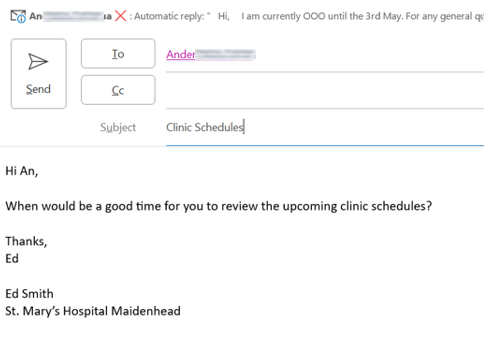 An example of where a MailTip will appear when you compose an email
| Last Reviewed Date | 02/05/2024 |
