
Overview
Robotic Process Automation (RPA) is a workflow automation technology that enables you to streamline business processes by mimicking and automatically executing rule-based tasks. There are two different categories of RPA, attended and unattended. This article is intended to provide or Power Platform Environment Administrators with an overview of unattended RPA and how to utilise it.
How does unattended RPA work?
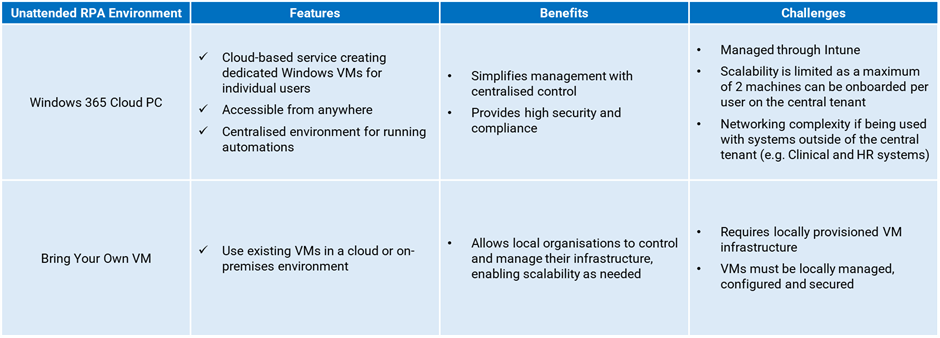
Unattended RPA flows run automatically based on triggers (like receipt of an email or recurring schedules) and execute on a W365 Cloud PC, or organisations can Bring your Own Virtual Machine (VM). While they operate independently, minimal human oversight is needed to monitor successful completion of flows and detect any errors. The only exception is in approval flows where a designated approver may be involved, functioning as a ‘third party’ to the automation rather than a participant in the process.
Application accounts should be used for Unattended RPA flows to ensure that access is limited to applications and data that are required to execute the specific scope of each automation. These accounts use SSO (Single Sign-On) to enable access to supported NHS.net Connect applications (NHSmail Single Sign-On Guide) and local organisations are responsible for ensuring that credentials for the accounts should be stored securely. Any authentication required to complete a flow will be completed automatically and once the flow is complete, it signs out from the device. Flows can be configured to report on their activity (e.g. via an email) or environment administrators can monitor the status of flows through the desktop flow activity dashboard.
How do I get started with Power Automate Unattended RPA?
The Microsoft offering of unattended RPA within NHS.net Connect can be executed using one of two options, Windows 365 (W365) Cloud PCs, and Bring Your Own Virtual Machines (VMs). W365 Cloud PC is a cloud-based service that creates dedicated Windows VMs for individual users, accessible from anywhere. Bring Your Own VM allows organisations to use existing VMs hosted in an organisation’s cloud environment, such as Microsoft Azure.
This section details the steps to get started with unattended RPA, including setting up a W365 Cloud PC or Bring Your Own VMs,assigning the necessary licences, registering the virtual machine, and creating a flow to trigger automation.
A new organisation onboarding Unattended RPA must:
- Onboard the required licences
- Create or amend your Power Platform Environment and request ‘Advanced’ DLP policy
- Implement security guidelines
- Start using Cloud PC or Bring your Own VM
- Monitor your unattended workflows and AI builder credit consumption
Please consult the Supported Licence top ups and the Power Automate subscriptions articles for more information on the licences and top ups supported in the NHS.net Connect shared tenant.
| Last Reviewed Date | 10/10/2025 |
