
Understanding your new NHS.net Connect experience
👋Welcome to the February edition of .Net News
In our first edition, we introduced NHS.net Connect and shared what is changing as organisations begin to migrate.
This month, we are focusing on how NHS.net Connect is structured, so you understand:
- Where to go before you log in
- What you will see once you are logged in
- How to get help and support in the new service
Good news! Over the past few months, we have successfully migrated 84 organisations, with participants repeatedly highlighting the minimal impact on end users.
🧩One service, three key areas
NHS.net Connect brings together tools, access and support in a clearer, more joined up way. You can think of it as having three main areas, each with a different purpose.
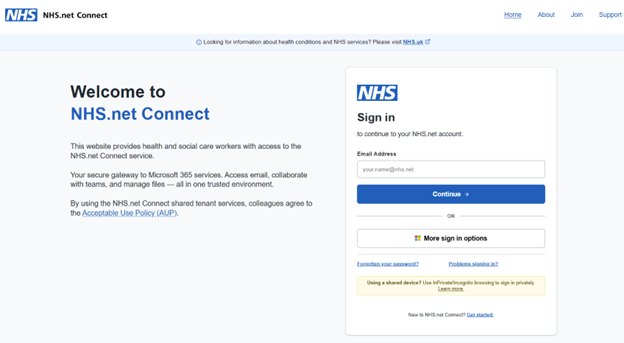
1. Before you log in: the NHS.net Connect login page
Before logging in, you will land on a new NHS.net Connect login page. This replaces the current NHSmail Portal homepage.
From here, you will be able to:
- Log into NHS.net Connect
- Get help with common log in issues (such as password resets)
- Learn more about the service
This creates a simpler, clearer starting point than today’s portal experience.
3. After you log in: the Launchpad
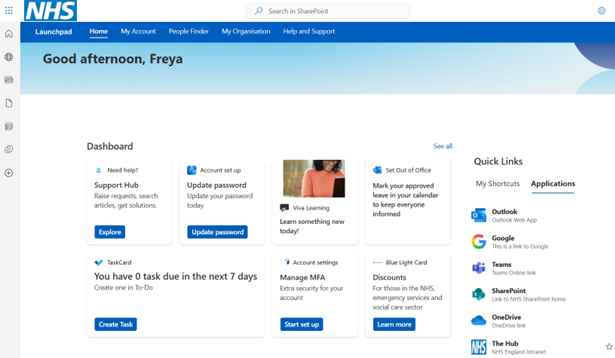
Once you have logged in, you will arrive at the Launchpad – your personalised home within NHS.net Connect.
The Launchpad is designed to give you:
- Quick access to the tools you use most (for example, Outlook and Teams)
- A personalised homepage that surfaces relevant updates and information
- Easy navigation to other areas of the service
- You will also be able to self-serve for common issues such as password reset, multi-factor authentication (MFA), managing guests and setting your Account Secret
For most users, this will become the place you start your day when working on NHS.net.
3. Getting help: the Support Hub
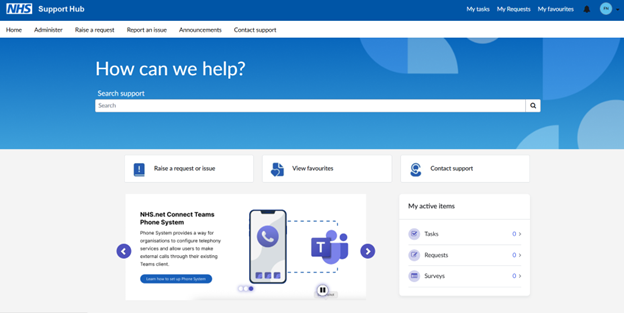
The Support Hub is the home of help and guidance. It replaces the existing NHSmail Support Site.
From the Support Hub, you will be able to:
- Search a new and improved Knowledge Base – a library of helpful articles and guides
- Raise issues or requests in specific support areas
- Track the status of any requests you have already raised
- See announcements and service updates
Support articles follow a consistent, accessible format and are easier to search, save and rate – use this as your first port of call when needing help
📅What happens over your organisation’s migration weekend?
 When your organisation migrates to NHS.net Connect:
- There is no downtime
- You do not need to take any action – simply enjoy the new experience
- If you accidentally log in to the old NHSmail Portal, you will see a redirection message, guiding you to the right place
🎓Learning and support resources
Ahead of and during migration, you will have access to a range of resources designed for different learning styles, including:
- Short videos
- Visual feature maps
- Frequently Asked Questions (FAQs) and knowledge articles
- Step-by-step guidance
The following resources have already been uploaded to Viva Learning, please follow the links to find out more about NHS.net Connect:
- Introductory Pack for End Users
- FAQs for End Users
- Day 1 Cheat Sheet for End Users
- If you have not accessed Viva Learning before, visit this Support Site article on how to access Viva Learning for the first time
Your organisation will soon receive its migration date, so please also look out for local communications. The latest updates will continue to be published in .Net News
| Last Reviewed Date | 26/02/2026 |
